Cybersecurity Career Roadmap (12-Month Plan)
Phase 1: Digital Foundations
(Months 0–2)
Starting Point:
CyberStart: MS Windows & MS Office
Goal: Build essential computer and workplace skills
Focus:
- Navigating the Windows operating system
- File management and organization
- Using Microsoft Word and Excel
- Basic troubleshooting and digital awareness
Hands-On:
- Create and save documents
- Build simple spreadsheets
- Practice organizing files and folders
- Perform basic troubleshooting (restart, updates, connections)
Outcome:
You gain confidence using a computer and understand how digital tools are used in real-world environments.
Phase 2: Certification & Skill Validation
(Months 2–4)
Goal: Prove your foundational skills to employers
Certifications:
- Microsoft Office Specialist: Word
- Microsoft Office Specialist: Excel
Focus:
- Document formatting and professional writing
- Data organization and basic analysis in Excel
Hands-On:
- Create resumes, reports, and letters
- Build budgets, trackers, or simple data sheets
Outcome:
You are now workplace-ready with verified digital skills.
Phase 3: IT Fundamentals
(Months 4–6)
Goal: Understand how computers and systems work behind the scenes
Certifications:
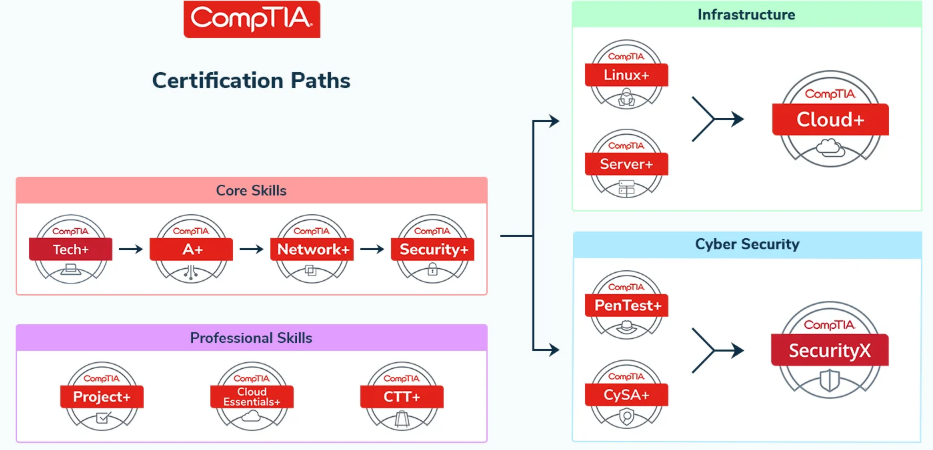
- CompTIA Tech+
- CompTIA Cloud Essentials+
Focus:
- Hardware and software basics
- Intro to networking
- Cloud computing concepts
- Security awareness
Hands-On:
- Install and update software
- Explore system settings
- Practice basic troubleshooting scenarios
Outcome:
You transition from computer user → entry-level IT learner
Phase 4: IT Support Career Skills
(Months 6–9)
Goal: Become job-ready for entry-level IT roles
Certification:
- CompTIA A+
Focus:
- Operating systems in depth
- Hardware troubleshooting
- Help desk and customer support skills
- Hands-On:
Diagnose common computer issues
- Simulate help desk tickets
- (Optional) Build a simple home lab
Outcome:
- You qualify for:
- IT Support Specialist
- Help Desk Technician
Phase 5: Networking & Cybersecurity
(Months 9–12)
Goal: Transition into cybersecurity
Certification: Networking
CompTIA Network+
Learn:
How devices communicate
Network setup and troubleshooting
Certification: Security
CompTIA Security+
Learn:
Threat detection and prevention
Risk management
Security tools and best practices
Hands-On:
Identify phishing and scams
Practice with basic security labs
Explore beginner platforms like TryHackMe
Outcome:
Cybersecurity Analyst
SOC Analyst
Entry-level Security Roles
Key Message to Students
You are not just taking classes—you are building a career pathway step by step:
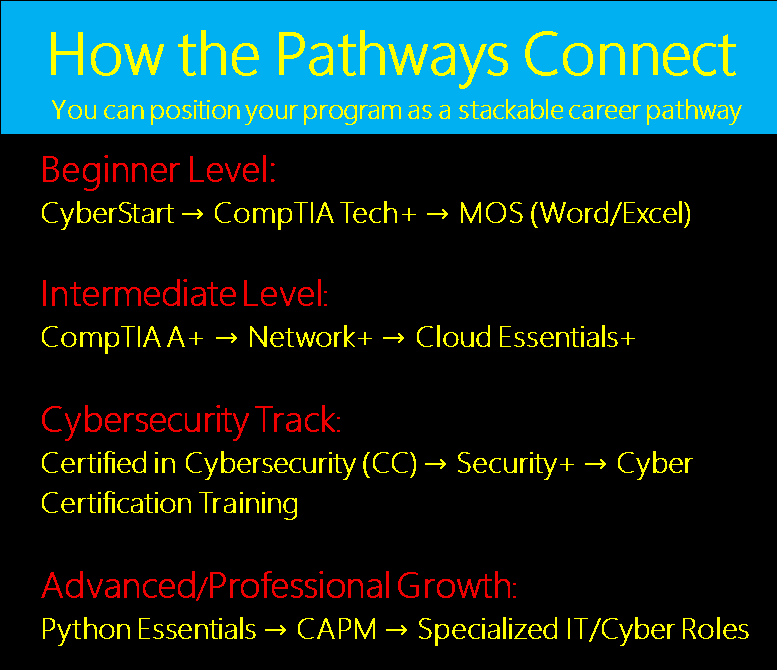
Start with CyberStart: MS Windows & MS Office
Validate skills with MOS certifications
Learn how technology works (Tech+, Cloud)
Become job-ready (A+)
Specialize in cybersecurity (Network+ and/or Security+)
Final Perspective
Every cybersecurity professional starts exactly where you are now—with the basics. The difference between those who succeed and those who don’t is simple: Consistency and progression. Follow this roadmap, stay hands-on, and keep moving forward—you’ll build not just skills, but a real pathway into the cybersecurity field.